AI WORKFLOWS
Cross-Platform Experience Design with AI-Augmented UX (5 tested workflows)
Key Tools & Techniques
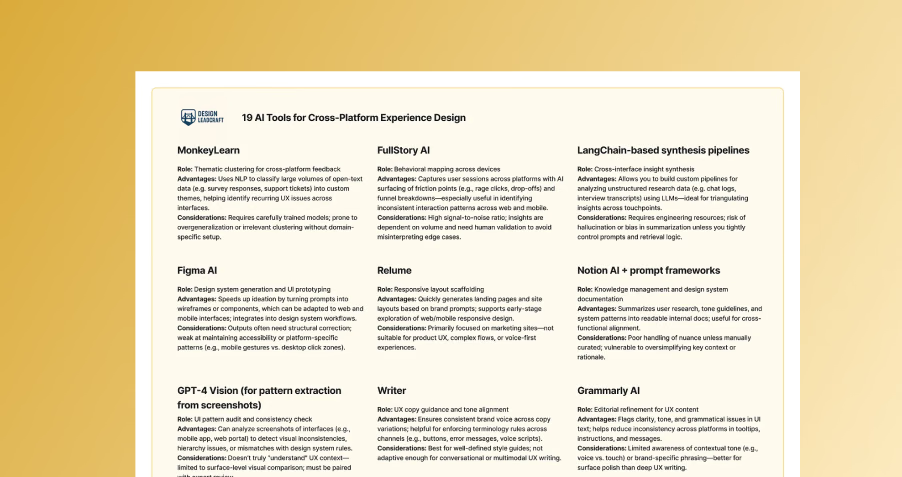
Includes over 19 AI tools I experimented with
01
Challenge
As products stretch across web dashboards, mobile apps, and voice assistants, inconsistency becomes inevitable. Tone shifts. Interaction patterns fracture. The brand feels different depending on the surface—and that undermines trust.
The solution isn’t just more design effort. It’s systemic thinking—a layer of unified intelligence that sees the whole journey, not just individual screens. And this is where AI can help: not by replacing designers, but by acting as a connective tissue across silos.
02
5 AI-augmented workflows
Workflow 01
System Mapping
Make the invisible frictions visible
What to do
Use AI to analyze user journeys, interface logs, and support tickets across platforms. You’ll uncover inconsistency hotspots—places where the experience splinters.
How AI helps
- Use LLMs to summarize friction themes from open-ended feedback
- Apply clustering techniques (e.g., embeddings + PCA) to usage telemetry
- Run comparison audits on UI copy, navigation patterns, and error handling flows
Best-in-class tools
- MonkeyLearn
- FullStory AI
- LangChain-based synthesis pipelines
Workflow 02
Design System generation
Define patterns that travel
What to do
Create a design system that goes beyond visuals—one that encodes logic, tone, and adaptive behavior across modalities. One-size-fits-all components rarely work across touchpoints. A button on a mobile app is not the same as an intent on a voice interface.
How AI helps
- Generate interaction primitives using prompts (e.g., “How might this pattern adapt for voice?”)
- Codify reusable decision trees for error states, confirmations, and microcopy
- Analyze existing components to detect implicit inconsistencies
Best-in-class tools
- Figma MCP + coding agent
- Relume
- Notion AI + prompt frameworks
- GPT-4 Vision for pattern extraction from screenshots
Workflow 03
Content Strategy
Language that surfaces with empathy
What to do
Craft platform-aware content strategies: tone, pacing, verbosity, and error messaging must flex across surfaces. The same phrase can be helpful on mobile and annoying on voice. AI can help with guided content generation and validation.
How AI helps
- Generate copy variants based on context-specific personas or use cases
- Simulate user-agent interactions in voice (via prompt chaining)
- Validate tone using AI-powered sentiment + intent models
Best-in-class tools
- Writer
- Grammarly AI
- ElevenLabs (for voice synthesis testing).
Workflow 04
Interaction Design
Think in flows, not screens
What to do
Design interactions as adaptive flows, not isolated screens. Mobile taps, desktop clicks, and voice intents should all feed into the same underlying user goals. Interfaces differ, but outcomes should not. AI can help build “flow scaffolds” that stretch and compress across modalities.
How AI helps
- Generate adaptive flowcharts based on task models
- Prototype modal variants quickly (e.g., card UI → voice dialogue → chatbot flow)
- Identify edge case gaps automatically using generative testing
Best-in-class tools
- Uizard
- Voiceflow
- FigJam AI
- Miro AI.
Workflow 05
Validation
Test the journey, not the channel
What to do
Evaluate your experience not in isolation, but as a unified story. Did the user accomplish their goal across devices? Multi-platform validation reveals hidden blockers (e.g., incomplete handoffs, unclear transitions, memory mismatches).
How AI helps
- Automate usability tests across form factors (e.g., simulate task continuity)
- Analyze drop-off points using NLP across survey and usage data
- Generate comparative experience heatmaps from user feedback
Best-in-class tools
- Maze
- PlaybookUX
- Hotjar with GPT-4 tagging
- UserLeap
03
Key Takeaways
Modern UX is no longer about cloning interfaces across devices but about creating a coherent, continuous conversation that respects the unique context of each platform (web, mobile, or voice)
AI tools should be used to bridge silos by synthesizing fragmented feedback, automating system mapping, and ensuring consistency in logic and tone across different touchpoints
Designers should leverage AI-augmented workflows to build adaptive "flow scaffolds" that focus on achieving consistent user outcomes rather than identical visual appearances across all surfaces